Page 11 - Microsoft
P. 11
SERVER 2012 R2 SERVER 2012 R2
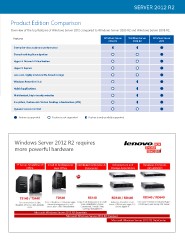
Product Edition Comparison
Overview of the top features of Windows Server 2012 compared to Windows Server 2003 R2 and Windows Server 2008 R2.
Features Windows Server Windows Server Windows Server
Beyond virtualization 2003 R2 2008 R2 2012
The power of many servers, Enterprise-class scale and performance
the simplicity of one Shared-nothing live migration
Hyper-V Network Virtualization
Every app, any cloud
Hyper-V Replica
Modern workstyle, enabled Low-cost, highly available ile-based storage
Windows PowerShell 3.0
Hybrid applications
Multitentant, high-density websites
Windows Server 2012 Overview Simpliied, feature-rich Virtual Desktop Infrastructure (VDI)
Dynamic Access Control
Windows Server powers many of the worlds’ largest datacenters, enables small businesses around the world, and delivers
value to organizations of all sizes in between. Windows Server 2012 redeines the server category, delivering hundreds of new Feature is supported Feature is not supported Feature is only partially supported
features and enhancements spanning virtualization, networking, storage, user experience, cloud computing, automation,
and more. Windows Server 2012 offers the lexibility to build infrastructure across premises on an open, scalable, and elastic Client Access License (CAL)
web and application platform. Simply put, Windows Server 2012 helps you transform your IT operations to reduce costs and
deliver a whole new level of business value. CALs are different from Server Software Licenses.
Windows Server 2012 R2 requires
A server Client Access License (CAL) is a license that gives users and devices the right to legally
Windows Server 2012 Editions access a server installed with Microsoft server software.
more powerful hardware
CALs are cost-effective and scalable.
You pay only for the licensing you need. You can adapt your licensing needs by buying CALs as
your business grows.
Windows Server 2012 CALs provide access to Windows Server 2012 or any previous version.
CALs from any previous Windows Server version, only work for that version or any previous version.
Editions Datacenter Standard Essentials Foundation Types of Windows Server CALs
• High density • Low density or no • Cloud connected irst • Economical general
virtualization virtualization server purpose User CALs Single user with Device CALs Single device with RDS CALs Required for remote
• Unlimited virtual • Two virtual instances • No virtualization • No virtualization unlimited devices. unlimited users. desktop access.
Feature comparison instances • All features rights rights Ideal for companies Ideal for companies Ideal for companies
• All features • 2 processors • 1 processor with employees with multiple users with users that need
• Limited features • Limited features who need to have for one device, such to access programs
roaming access to the as shift workers. or the full desktop
Server
Server
Licensing model Processor + CAL* Processor + CAL* 25 user limit 15 user limit corporate network remotely.
using multiple devices,
as well as from
Running instances in physical operating 1 1 ** 1 *** 1 unknown devices.
system environment (POSE)
© 2013 Microsoft Corporation. All rights reserved. This datasheet is for informational purposes only.
Running instances in virtual operating Unlimited 2 1 *** 0 Microsoft makes no warranties, express or implied, with respect to the information presented here.
system environment (VOSE)
* Client Access Licenses (CALs) are required for every user or device accessing a server. See the End User License Terms
(http://www.microsoft.com/About/Legal/EN/US/IntellectualProperty/UseTerms/Default.aspx) for details.
** When a customer is running all allowed virtual instances, the physical instance may only be used to manage and service the virtual instances.
*** Essentials can be run in either a physical or virtual operating system environment “1 or 1.”
Product Edition Comparison
Overview of the top features of Windows Server 2012 compared to Windows Server 2003 R2 and Windows Server 2008 R2.
Features Windows Server Windows Server Windows Server
Beyond virtualization 2003 R2 2008 R2 2012
The power of many servers, Enterprise-class scale and performance
the simplicity of one Shared-nothing live migration
Hyper-V Network Virtualization
Every app, any cloud
Hyper-V Replica
Modern workstyle, enabled Low-cost, highly available ile-based storage
Windows PowerShell 3.0
Hybrid applications
Multitentant, high-density websites
Windows Server 2012 Overview Simpliied, feature-rich Virtual Desktop Infrastructure (VDI)
Dynamic Access Control
Windows Server powers many of the worlds’ largest datacenters, enables small businesses around the world, and delivers
value to organizations of all sizes in between. Windows Server 2012 redeines the server category, delivering hundreds of new Feature is supported Feature is not supported Feature is only partially supported
features and enhancements spanning virtualization, networking, storage, user experience, cloud computing, automation,
and more. Windows Server 2012 offers the lexibility to build infrastructure across premises on an open, scalable, and elastic Client Access License (CAL)
web and application platform. Simply put, Windows Server 2012 helps you transform your IT operations to reduce costs and
deliver a whole new level of business value. CALs are different from Server Software Licenses.
Windows Server 2012 R2 requires
A server Client Access License (CAL) is a license that gives users and devices the right to legally
Windows Server 2012 Editions access a server installed with Microsoft server software.
more powerful hardware
CALs are cost-effective and scalable.
You pay only for the licensing you need. You can adapt your licensing needs by buying CALs as
your business grows.
Windows Server 2012 CALs provide access to Windows Server 2012 or any previous version.
CALs from any previous Windows Server version, only work for that version or any previous version.
Editions Datacenter Standard Essentials Foundation Types of Windows Server CALs
• High density • Low density or no • Cloud connected irst • Economical general
virtualization virtualization server purpose User CALs Single user with Device CALs Single device with RDS CALs Required for remote
• Unlimited virtual • Two virtual instances • No virtualization • No virtualization unlimited devices. unlimited users. desktop access.
Feature comparison instances • All features rights rights Ideal for companies Ideal for companies Ideal for companies
• All features • 2 processors • 1 processor with employees with multiple users with users that need
• Limited features • Limited features who need to have for one device, such to access programs
roaming access to the as shift workers. or the full desktop
Server
Server
Licensing model Processor + CAL* Processor + CAL* 25 user limit 15 user limit corporate network remotely.
using multiple devices,
as well as from
Running instances in physical operating 1 1 ** 1 *** 1 unknown devices.
system environment (POSE)
© 2013 Microsoft Corporation. All rights reserved. This datasheet is for informational purposes only.
Running instances in virtual operating Unlimited 2 1 *** 0 Microsoft makes no warranties, express or implied, with respect to the information presented here.
system environment (VOSE)
* Client Access Licenses (CALs) are required for every user or device accessing a server. See the End User License Terms
(http://www.microsoft.com/About/Legal/EN/US/IntellectualProperty/UseTerms/Default.aspx) for details.
** When a customer is running all allowed virtual instances, the physical instance may only be used to manage and service the virtual instances.
*** Essentials can be run in either a physical or virtual operating system environment “1 or 1.”